
👋 Want to manage your CareApp notifications?
You’re in the right place! This guide will help you change your notification preferences, whether you’re using the mobile app or web version, so you can get only the notifications you want.
What kinds of notifications are there?
CareApp offers two main types of notifications you can control:
1. App notifications (push notifications):
These appear directly on your phone, even when your screen is off. For example, your phone might light up with a notification alerting you that there’s a new post on CareApp.
You can tap the notification to go straight into the app.
2. Email notifications:
CareApp can also send automated emails to your inbox with the same information as app notifications.
Email notifications allow you to click through to CareApp to view the post or update.
You can receive notifications for:
New content or posts
New notices
Well-being checks
New comments or questions
Feedback (unless switched off)
Access requests (for coordinators and provider administrators)
Changing Your Notification Preferences
You can adjust which notifications you receive on CareApp, turning some on or off to suit your needs.
Mobile
- Tap Settings in the left-side menu.

- Tap Notifications.

- Toggle notifications on or off as desired. Green = on, grey = off.

- Tap Save to apply your changes.

Web
- Click your name at the bottom of the left-side menu on CareApp web.
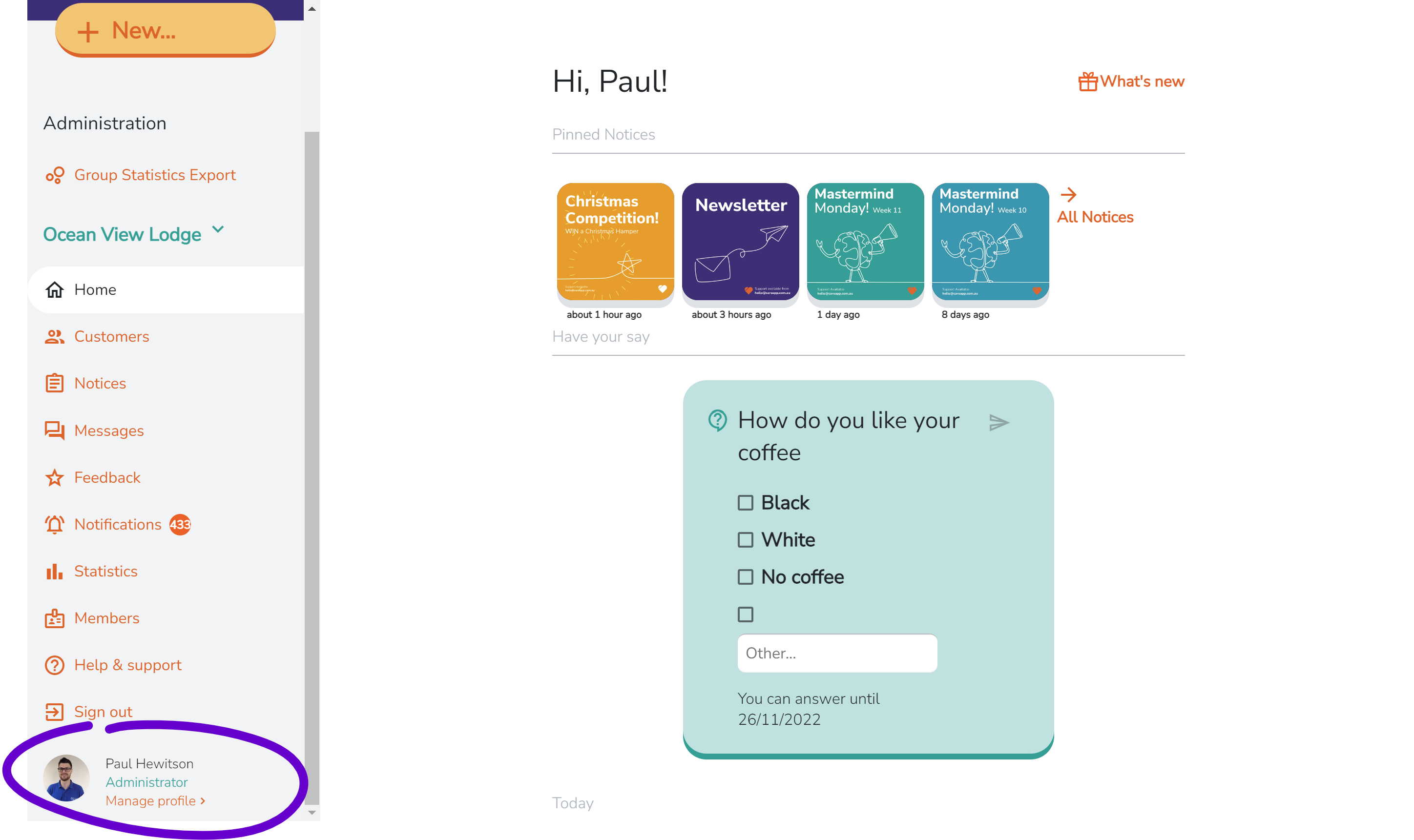
- Click Notifications.

- Toggle notifications on or off as desired. Green = on, grey = off.

👋 Want to stop CareApp notifications completely?
If you’d like to stop all CareApp notifications entirely:
Go to your Notifications settings (see steps above).
Toggle all notifications off. Make sure every option is grey.
Tap Save to confirm.
Note: Turning all notifications off will stop all alerts from CareApp. You can always return to these settings if you want to receive notifications again.
📱 Why am I not receiving CareApp notifications?
If you’re not receiving CareApp notifications, even though notifications are switched on inside the app, this is usually caused by phone-level settings rather than an issue with CareApp itself.
Your phone controls how and when apps can send notifications, and these settings can sometimes block or silence alerts without it being obvious.
Here are a few common things to check:
Notification permissions
Make sure notifications are enabled for CareApp in your phone’s settings (not just inside the app).Do Not Disturb or Focus modes
Features like Do Not Disturb, Sleep, or Work Focus can temporarily silence notifications.Battery or background restrictions
Some phones limit background activity to save battery, which can prevent notifications from coming through.Silent notifications
Notifications may be allowed but set to silent, meaning they won’t make a sound or appear as alerts.
If everything looks correct and notifications still aren’t coming through, we recommend:
Restarting your phone
Logging out and back into CareApp
Making sure your phone and the CareApp app are up to date
If you continue to have issues, please contact our support team and we’ll be happy to help.
Delete📧 Why am I not receiving CareApp email notifications?
If you’re not receiving CareApp email notifications, it doesn’t always mean the emails aren’t being sent. In many cases, the emails are being filtered or blocked by your email provider.
Here are a few things to check:
Spam or Junk folders
CareApp emails may have been filtered into your Spam or Junk folder, especially if you’re receiving them for the first time.Promotions or Other folders
Some email providers (like Gmail) sort emails into different tabs. Please check all folders.Email address filters or rules
Your email account may have rules set up that automatically move or block certain emails.Work or organisation email systems
If you’re using a work or facility email address, security filters may block automated emails.Blocked sender list
Make sure CareApp hasn’t been accidentally added to your blocked senders list.
To help ensure CareApp emails arrive safely, we recommend:
Adding CareApp’s email address to your contacts or safe senders list
Marking a CareApp email as “Not Spam” if you find one in Junk
Checking that the email address on your CareApp account is correct
If you’re still not receiving emails after checking the above, please contact our support team and we’ll be happy to investigate further.
Delete